
How to enable post-quantum protection in Proton Mail
- Leitura
- 2 min
- Categorias
- Email encryption
- Proton Mail
Note: Post-quantum protection is being rolled out gradually in Proton Mail. If you do not see the option in your account yet, there is nothing you need to do. It will become available soon.
You can enable post-quantum protection in Proton Mail to generate new quantum-resistant encryption keys for your account.
How it works
- When you enable post-quantum protection, your account starts using new encryption keys designed to protect future encrypted emails against quantum-capable attacks.
- Post-quantum protection applies to new encrypted emails going forward. It does not retroactively re-encrypt emails that are already in your mailbox, for now.
- If you have end-to-end encrypted forwarding enabled, it is not currently compatible with post-quantum protection. Enabling post-quantum protection will pause end-to-end encrypted forwarding.
- You may notice a small performance impact after enabling it, but on modern hardware Proton Mail should generally feel the same.
Minimum app requirements
Post-quantum protection requires that all Proton apps you use are updated to a recent version. If you don’t see the option to enable post-quantum protection, please make sure each of your Proton apps has been updated to at least the minimum version listed below.
| Product | Platform | Minimum version |
| Android | 7.0.0 | |
| iOS | 7.0.0 | |
| Calendar | Android | 2.24.1 |
| iOS | 2.20.0 | |
| Authenticator | iOS | 1.4.2 |
| macOS | 1.4.2 | |
| Meet | Android | 1.0.3 |
| iOS | 1.0.3 | |
| Drive | Windows | 1.13.4 |
| macOS | 2.9.0 | |
| iOS | 1.54.0 | |
| Android | 2.23.0 | |
| Export tool | All platforms | 1.0.5 |
| Bridge | All platforms | 3.22.0 |
| Pass | Android | 1.32.0 |
| iOS | 1.19.2 | |
| macOS | 1.19.2 | |
| VPN | macOS | 5.1.0 |
| iOS | 6.3.0 | |
| AppleTV | 1.3.0 | |
| Android | 5.12.25 | |
| AndroidTV | 5.12.25 | |
| Wallet | Android | 1.2.7 |
| iOS | 1.2.7 |
Enable post-quantum protection
- Sign in to account.proton.me and open your account settings.
- Select Encryption and keys from the sidebar.
- Under Post-quantum protection, click Enable post-quantum protection.

- Read the confirmation prompt. If you want to continue, check the box and click Enable and generate keys. You’ll be asked to enter your password to confirm.
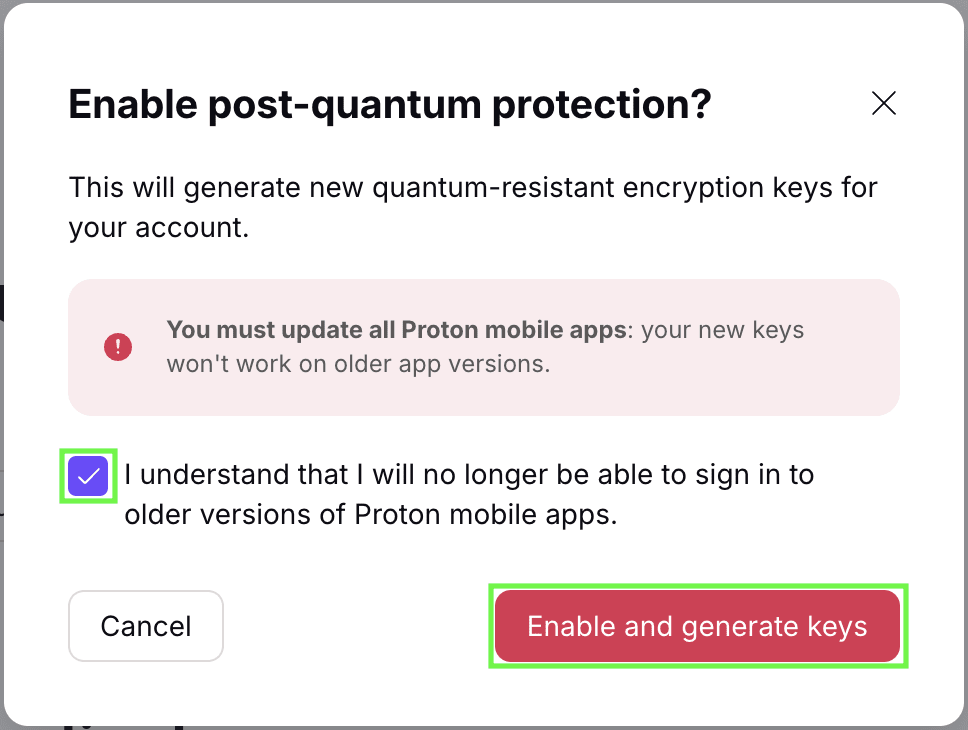
Post-quantum protection is now enabled for your account.
Manage your encryption keys
After enabling post-quantum protection, you can continue managing your email encryption keys and account keys the same way as before. This includes creating and managing keys, downloading your PGP keys, and using them with other PGP-compatible services.
